Editorial staff
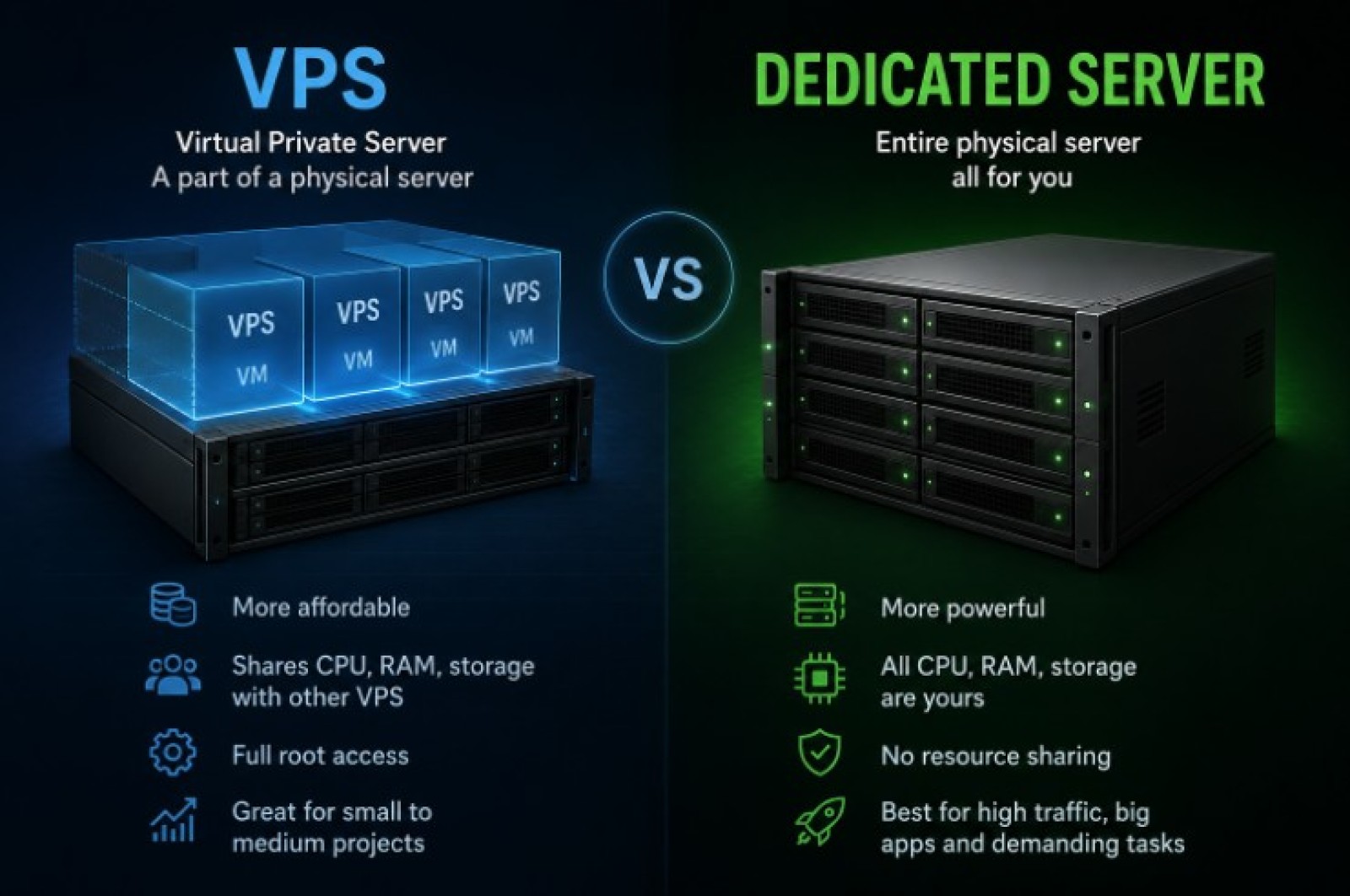
Someone slices it into many small virtual machines. One of those slices is your VPS.
You get:
- your own OS (for example Ubuntu);
- your own CPU share, RAM, disk;
- root access, so you install what you want.
You share the big physical box with other people, but your “mini‑server” behaves like a separate machine. If another VPS crashes, yours usually keeps working. If the host is honest and doesn’t oversell, performance is pretty stable.
VPS is great when:
- you have a small or mid‑size project;
- you care about price;
- you don’t need crazy hardware just for yourself.
What a Dedicated Server Is
A dedicated server is the whole physical machine for you alone.No neighbors. No slices.
You get:
- all CPU cores;
- all RAM;
- all disks and ports on that box.
You can reboot, reinstall, even mess up BIOS settings if the provider allows remote access. This is heavier stuff: more power, more responsibility, more money.
Dedicated is usually picked when:
- you run something big: large game servers, many sites, heavy databases;
- you need constant high performance;
- you need access to hardware features that a normal VPS simply doesn't expose.
Dedicated Server or VPS: Looking at the Basics
A VPS trades some control for lower costs. A dedicated server does the opposite:
- VPS = part of a physical server. Cheaper, enough for most small and mid projects. Slightly less control, some shared resources.
- Dedicated = whole physical server. More expensive, more power, full control, no sharing.
Think of it like housing:
- A VPS gives you separation and control without requiring a whole physical machine.
- Dedicated is like a whole house. Everything is yours, including the garden and the walls.
For many projects, the “flat” is more than enough. Understanding the difference between VPS and dedicated server helps avoid paying for resources you don't actually need.
When a VPS Is the Right Call
Let’s go through some real cases.
You want to host:
- a small game server for friends;
- a few client websites;
- a hobby API or bot;
- a test environment for code.
In all those cases, a VPS is usually the best value. You get root access, you can tune the system, but you’re not paying for 64 GB RAM and a pile of CPU cores you don’t use.
VPS also makes sense when you’re just starting and don’t fully know your load yet. You can begin cheap and light, then move up to a bigger VPS plan, or later jump to dedicated once you see real numbers.
When a Dedicated Server Makes More Sense
Now imagine other situations:
- a big game community with hundreds of players online;
- a busy online shop with high traffic and lots of orders;
- a large database with heavy writes and strict response times;
- video encoding, data crunching, serious analytics.
Here you may hit the limits of a VPS. Even if the host says “8 vCPU” or “16 vCPU”, it is still a share of a bigger CPU, not the whole chip. The provider can’t give you the same raw power as your own box at the same price.
Dedicated also shines when you care about low‑level tuning: custom RAID setup, pass‑through disks, direct access to GPU, and so on. On a normal VPS, you usually can’t do that.
The Truth About “Free VPS”
You will see attractive promises like free vps server without credit card.
It sounds perfect: you get your own server, you pay nothing, and you don’t even give card info.
Here's what typically happens:
- really small plans with just 1 vCPU, a bit of RAM, and barely any storage;
- strict caps on CPU time, traffic, or how long your applications can keep running;
- trial only for a few days or weeks;
- “free” but with forced ads and heavy restrictions.
These setups can be useful for:
- quick tests of a script;
- learning how to use Linux and SSH;
- short experiments with deployment.
The catch is this: for anything real – game server, small production site, real users – they are usually not stable or powerful enough. Also, “no credit card” often means “we don’t care if someone abuses it”, so those free nodes are overloaded, slow, or even blacklisted by some services.
If you’re just playing with commands and learning, go ahead and try. For an actual project, plan to pay at least a small monthly fee. That is the price of sane uptime and basic support.
Where Small SaaS Projects Fit In
Now imagine you’re building a tiny online tool: maybe habit tracking, a simple CRM, or some niche service for a few clients. Not a huge startup yet, but something real.
For a lot of founders, vps hosting for small saas projects ends up being the most practical option. It keeps costs under control while still giving enough room to build and grow. You want:
- control over the OS and stack;
- the ability to run background workers and scheduled jobs;
- enough RAM for your app, database, and cache.
One reasonably sized VPS can support more than many people expect. Small and medium projects often keep things simple. One machine runs the application, stores the database, handles scheduled tasks, and maybe hosts a few internal utilities as well.
How Most People End Up Choosing
Before comparing more plans, ask yourself a handful of simple things:
- Do I already have enough users to actually stress a VPS?
- Do I really need custom hardware features (RAID tricks, GPU, special network cards)?
- Is my budget ready for a higher monthly bill plus more admin work?
If the honest answers are “no, not yet”, stick with VPS. If you’re hitting CPU and RAM limits on a strong VPS, and you know the traffic is not going down, then it’s time to think about a dedicated server.
Short Wrap‑Up
VPS is the flexible, affordable choice for most new projects: game servers, small sites, early‑stage SaaS, hobby tools. Dedicated servers are for heavy, stable workloads that need all the power of a full machine.
Free VPS offers look nice but usually work only for tests and learning, not for real users. For anything serious, you’ll want a paid plan with clear specs, real support, and a provider that doesn’t vanish overnight.
So the move is simple: start on a solid VPS, watch real usage, and only step up to a dedicated server when you’ve actually outgrown it, not just because a banner told you it’s “pro”.
 Editorial staff