Editorial staff
First of all, you can very much create it with simple specialized game engines. If you have a story in your head and you want to see it on a screen without spending years learning C++ or Unity, you still have options to make your concept a reality. This short read is for you if you’ve got zero skills in coding and instead your main engine is inspiration (with a low budget).
Realistic Goals and Small Steps
An important clarification! Your first project must be quite simple. Envision a short game (that you might have to offer for free) with around 2-4 hours of gameplay and a condensed story. It can even be a short challenge, like Chicken Road free play, with just a bit of plot, readable visuals, and a minimal set of controls. So, the goal for a first game SHOULDN’T BE creating a complex narrative with unusual mechanics. Instead, focus on:
- Lovable Characters: cute, silly, relatable, fun, with realistic personalities.
- One Event: writing a short story with a clear motivation and a fast path.
- Understandable Layout: creating small spaces with easy-to-notice items.
- Basic Controls: just a couple of actions are needed to progress.
- Fun/Epic Finale: maybe even a couple of endings that stem from the plot logically.
Now, let’s proceed to work!
The Most Accessible Entry Point Into Game Development
You can work with RPG makers without a single bit of knowledge in how to code. RPG maker software is very much based on presets, but it's more accurate to think of it as a "Lego set" for game design. It provides the foundation so you don't have to build the engine itself from scratch.
Databases of RPG Makers
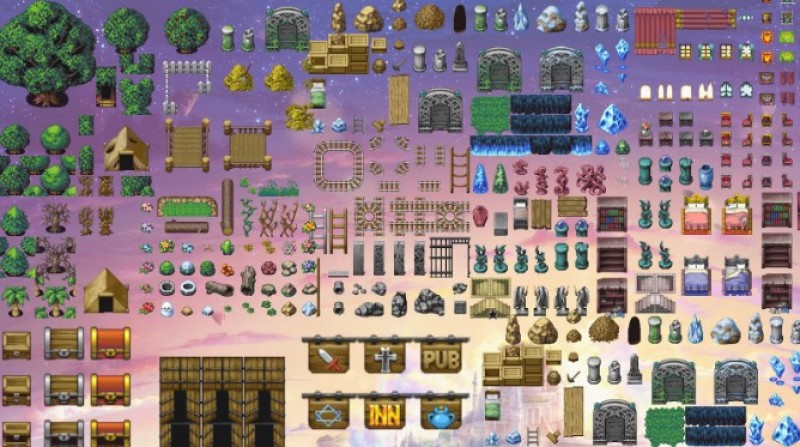
The core of RPG Maker is a massive Database where all the math and rules of an RPG are already set up. You don't have to code a "Level Up" system or a "Turn-Based Battle" system; they are already there as presets.
- Actors/Classes: You choose a character’s name, their starting stats (HP, Attack, etc.), and how much they grow each level.
- Items & Equipment: You create a "Steel Sword" by clicking "New," giving it a name, and setting it to "Attack +[number]."
- Enemies & Troops: You define monster stats and group them together for battle encounters.
Painting Your New World
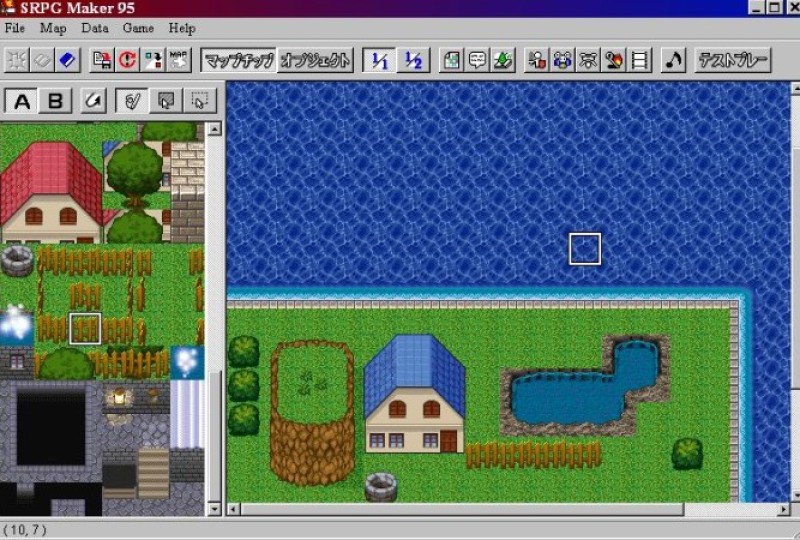
Instead of 3D modeling, RPG Maker uses a Tile-based system. It works like a digital coloring book and is easy to use after an hour of practicing.
- You select a "Tileset" (like Forest, Town, or Dungeon).
- You click on a grass tile and "paint" it onto a grid to make a field.
- You click on a tree tile (or another that you need) and place it on top.
Auto-tiles automatically handle edges, so if you draw a pond, the software automatically adds the shoreline for you.
Visual Scripting Time
This is how you make things happen without coding. To make an NPC talk or a treasure chest open, you use Events:
- Point and Click: You right-click a spot on the map and choose "New Event."
- Command List: You pick from a list of pre-written commands like "Show Text," "Change Gold," or "Battle Processing."
- Logic: You can use "Switches" (On/Off toggles) and "Variables" (Numbers) to create logic, like making a bridge appear only after the player finds a specific key.
Customization Is Also Needed
While it comes with a "RTP" (Runtime Package) of default art and music, you aren't stuck with them. You can make your project more unique with…
- Custom Assets: You can import your own art, music, and sound effects to make your game look like nothing else.
- Plugins/Scripts: If you want to change how the game fundamentally works (like changing the battle system from turn-based to real-time) you can use Plugins (JavaScript in newer versions) written by the community or yourself.
“Day One” Experience
Given all the presets, you can make your new character walk around a room in approximately 40 minutes. Will it be working consistently? Yes. Will it also be generic? Yes as well. This is where you must think about diversifying characters, items, and events.
The Learning Curve (Logic vs. Coding)
You still don't need to code, but you do need to learn Logic. Think of it like being a lawyer: you have to follow "If/Then" rules.
- Simple: "If the player has the Iron Key, then open the door."
- Complex: "If the player has talked to the Guard twice AND it is currently Nighttime, then change the Guard’s dialogue to this hint."
The latter is called Eventing, and it's the "meat" of the work. It’s easier than coding because you aren't typing commands. Still, you have to think logically to prevent bugs.
The Trap of Free Assets
Beginners make games that look identical to one another, and it’s completely normal. Still, there is a stigma that RPG Maker games are "cheap" because so many people use the default art. To make a game people want to buy, most creators eventually learn to import their own drawings or buy unique art packs. You don't have to be an artist, but you'll eventually want your game to look unique. Just don’t abuse AI here: most niche players hate it for… too many reasons to list.
RPG Maker Games That Sent People into Psychosis (in a Good Way)
Some great examples we have here! Several RPGs have created entire communities around them. And yes, they were created without coding.
- Omori: A massive, psychological horror RPG about trauma and friendship.
- To the Moon: A pure, tear-jerker narrative experience with almost no combat.
- OneShot: A surreal puzzle game that "breaks the fourth wall."
- Fear & Hunger + Termina: A brutal, dark-fantasy survival horror game.
- LISA: The Painful: A quirky side-scrolling RPG set in a post-apocalyptic wasteland.
- Ib: It’s focused on puzzles and atmosphere rather than stats or leveling.
- Mad Father: A story about a girl discovering her father’s experiments.
- The Witch's House: Legendary twist ending…
- Yume Nikki: No combat, no real "goals." You just explore a girl’s bizarre dreams.
- OFF: A highly stylized, French RPG with a very strange world.
Now, start! Your first attempt will definitely be just learning. Later, you might offer the gaming community a gem that will conquer the hearts and minds of various audiences. Best of luck to you, and may your inspiration flow!
 Editorial staff